



What to expect on the day of your fibre installation
Step 1:
Determining the best route
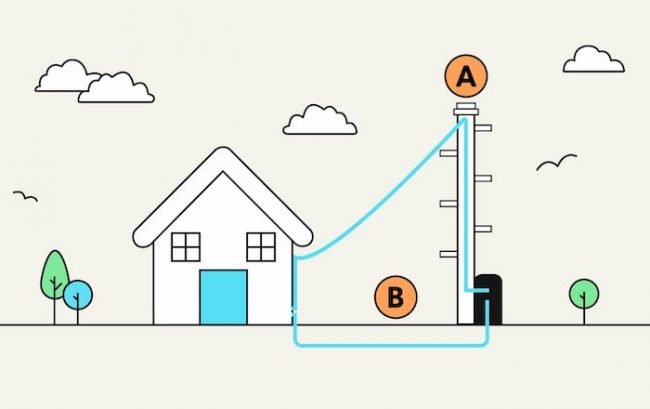
Our fibre optic cable can be connected to your property in one of two ways — either overhead via a nearby telegraph pole (A), or underground through existing ducts (B).
Before beginning the work, our engineer will confirm which installation method applies to your property.
Step 2:
Gaining access to your property
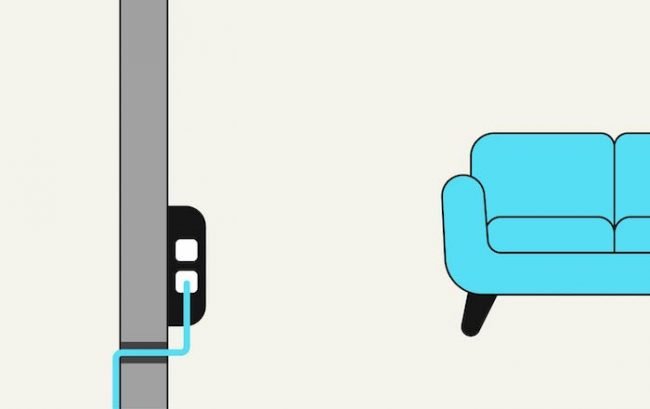
The engineer will discuss with you where you’d prefer the service to enter your home.
Once the cable reaches your property, it will be routed to the agreed entry point and carefully fed through a neatly drilled hole into your home.
Step 3:
Activating your service
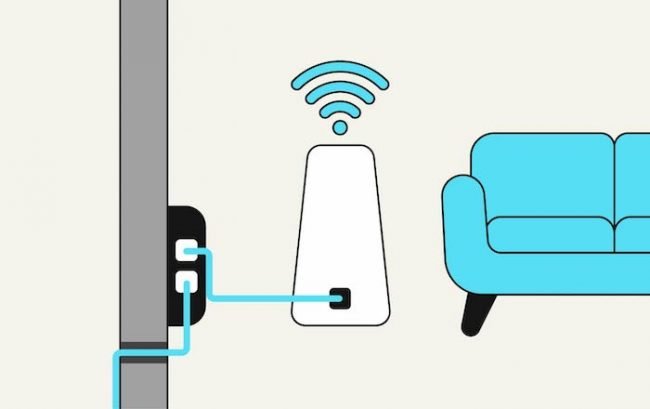
After the router is connected to your internal connection box, the engineer will set it up to ensure your new fibre broadband is ready to use.
You can then connect your devices via ethernet cables or your new WiFi network.
Finally, the engineer will test your connection to make sure everything’s working properly and answer any questions you may have.
Jack did the install and he was speedy, efficient, knowledgeable and very helpful. He showed me how the new system worked, set up the extender that I already had and even helped me connect my phone to the new WiFi. Thank you Jack!
How to make install day run smoothly
Fibre installations can take up to two hours.
Below are a few things to do before our engineers arrive:
1.
Live in rented accommodation? Don’t forget to ask your landlords permission to have a 10mm hole drilled through the wall so that our fibre cable can enter the property.
2.
Have a think about where you want our fibre cable to enter the property and ensure the engineer has space to work in that area. Our engineer will also be able to advise you on the best location.
3.
Two electric power sockets will need to be near where the cable enters. These will power your new ONU (Optical Network Unit) and router.
Frequently asked questions
All the equipment we use to get your broadband up and running is optimised for the Airband fibre network, creating a faster and more resilient broadband connection. Unfortunately, we cannot reconfigure any equipment you may already own.
If we need to use a ladder, we will secure it to the outside of your property by drilling two very small holes. Once we’ve finished your installation, we’ll seal the holes with coloured silicone to blend with your wall as best as possible.
To enter your property, it is sometimes necessary to attach the fibre cable to the outside of the property. Before doing anything, the engineer will discuss the fibre cable route with you. The engineer will do their utmost to ensure the fibre cable is as discreet and neat as possible.